Loading article...

A comprehensive technical guide to blockchain indexing with The Graph, exploring Graph Node architecture, AssemblyScript WASM mappings, GraphQL schemas, and decentralized GRT query markets.
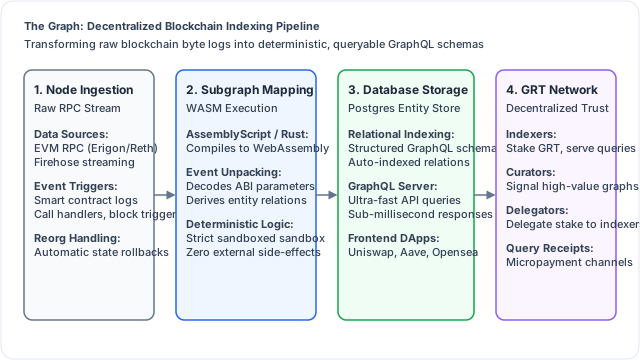
Modern web applications rely upon relational databases, document stores, and search indexes to serve responsive user interfaces. When a user navigates to an e-commerce platform or social media dashboard, backend systems query indexed PostgreSQL, Redis, or Elasticsearch clusters, returning user profiles, transaction histories, and real-time feeds in tens of milliseconds.
In public blockchain architectures, this relational data tier is completely absent. Blockchains like the Ethereum Foundation execution layer, Solana Protocol, Arbitrum Layer 2, and Base Protocol are optimized for transactional consensus and chronological block production, not for flexible data querying. State is recorded inside cryptographic Merkle Patricia Tries and append-only event logs, organized strictly by sequential block height.
Attempting to answer a standard consumer web query, such as "Show all active liquidity positions held by Alice across Uniswap v3, along with her historical trading volume and total fees earned over the past 30 days", using native JSON-RPC calls (eth_call and eth_getLogs) is technically impractical. An application would need to iterate through millions of historical blocks, make thousands of rate-limited network calls, unpack raw hex calldata, and reconstruct protocol state client-side in the user web browser.
The Graph Protocol ** resolves this fundamental data barrier. Designed as an open-source decentralized indexing and query protocol, The Graph allows software engineers to build and deploy open APIs called ** Subgraphs. Subgraphs read event logs directly from blockchain execution nodes, process that data through WebAssembly mapping functions, store relational entities in high-performance databases, and expose deterministic GraphQL endpoints to frontend applications. This masterclass provides an exhaustive architectural and implementation guide to building, testing, optimizing, and deploying subgraphs on The Graph decentralized network.
To understand why dedicated indexing middleware is mandatory for decentralized application engineering, one must evaluate the operational constraints of standard blockchain full nodes:
When an application queries historical data via an Ethereum JSON-RPC client like Geth, Erigon, or Reth, the node must search the transaction receipt bloom filters for every single block in the requested range.
If an application requests logs across a 500,000-block window (approximately 70 days on Ethereum mainnet), commercial infrastructure providers like Infura and Alchemy will reject the request with a timeout or payload-size-exceeded error (query returned more than 10000 results).
Blockchains frequently experience short-lived forks known as chain reorganizations (reorgs). During a reorg, blocks that were temporarily accepted at height $N$ are replaced by a longer, competing chain branch.
If a client-side frontend naively processes an event log from a block that is subsequently orphaned, the user interface will display corrupted balances or confirmed trades that never legally occurred on the canonical ledger.
Graph Node resolves this by tracking block confirmations and maintaining internal undo logs. If an execution client detects a reorg, Graph Node automatically rolls back entity mutations in PostgreSQL to the common ancestor block, replaying only the canonical branch events.
A subgraph is composed of three interconnected files that define what data to extract, how to structure it, and how to transform it:
subgraph.yaml)The manifest serves as the operational blueprint for Graph Node, specifying which contracts to listen to and which events trigger mapping execution:
specVersion: 0.0.5
schema:
  file: ./schema.graphql
dataSources:
  - kind: ethereum
    name: Factory
    network: mainnet
    source:
      address: "0x1F98431c8aD98523631AE4a59f267346ea31F984"
      abi: Factory
      startBlock: 12369621
    mapping:
      kind: ethereum/events
      apiVersion: 0.0.7
      language: wasm/assemblyscript
      entities:
        - Pool
        - Token
      abis:
        - name: Factory
          file: ./abis/factory.json
        - name: ERC20
          file: ./abis/ERC20.json
      eventHandlers:
        - event: PoolCreated(indexed address,indexed address,indexed uint24,int24,address)
          handler: handlePoolCreated
      file: ./src/factory.ts
schema.graphql)The schema defines the relational data model. Entities represent database tables, decorated with the @entity directive:
type Token @entity {
  id: Bytes!                   # Contract address
  symbol: String!
  name: String!
  decimals: BigInt!
  totalSupply: BigInt!
  tradeVolumeUSD: BigDecimal!
  txCount: BigInt!
}

type Pool @entity {
  id: Bytes!                   # Pool contract address
  createdAtTimestamp: BigInt!
  createdAtBlockNumber: BigInt!
  token0: Token!               # Foreign key relationship
  token1: Token!
  feeTier: BigInt!
  liquidity: BigInt!
  totalValueLockedUSD: BigDecimal!
  swaps: [Swap!]! @derivedFrom(field: "pool")
}

type Swap @entity(immutable: true) {
  id: Bytes!                   # Transaction hash + log index
  pool: Pool!
  sender: Bytes!
  recipient: Bytes!
  amount0: BigDecimal!
  amount1: BigDecimal!
  amountUSD: BigDecimal!
  timestamp: BigInt!
}
Architectural Tip: Using @entity(immutable: true) on historical events like Swap or Transfer instructs Graph Node that once saved, this record will never be modified. This enables massive database write optimizations, bypassing PostgreSQL row versioning.
src/mapping.ts)AssemblyScript is a strict subset of TypeScript that compiles directly to WebAssembly bytecode. It executes within a sandboxed runtime inside Graph Node, guaranteeing deterministic execution across all network indexers:
import { BigInt, BigDecimal } from "@graphprotocol/graph-ts";
import { Swap as SwapEvent } from "../generated/templates/Pool/Pool";
import { Pool, Swap, Token } from "../generated/schema";

export function handleSwap(event: SwapEvent): void {
/ Load the target Pool entity from the database
  let pool = Pool.load(event.address);
  if (pool == null) return;

/ Derive unique identifier: transaction hash concatenated with event log index
  let swapId = event.transaction.hash.concatI32(event.logIndex.toI32());
  let swap = new Swap(swapId);

  swap.pool = pool.id;
  swap.sender = event.params.sender;
  swap.recipient = event.params.recipient;
  swap.amount0 = event.params.amount0.toBigDecimal();
  swap.amount1 = event.params.amount1.toBigDecimal();
  swap.timestamp = event.block.timestamp;

/ Calculate USD valuation using oracle reference feeds (omitted for brevity)
  let derivedUSD = BigDecimal.fromString("0");
  swap.amountUSD = derivedUSD;

/ Persist the immutable event record
  swap.save();

/ Update cumulative pool state
  pool.liquidity = pool.liquidity.plus(event.params.amount0.abs());
  pool.save();
}
To understand the complete development lifecycle, follow this step-by-step tutorial building a production-grade subgraph using Graph CLI.
Ensure you have Node.js installed. Initialize a new subgraph scaffolding targeting a deployed contract:
npm install -g @graphprotocol/graph-cli

graph init   --product subgraph-studio   --from-contract 0x1F98431c8aD98523631AE4a59f267346ea31F984   --network mainnet   --contract-name Factory   --index-events   uniswap-v3-subgraph
Whenever you modify schema.graphql or contract ABIs in subgraph.yaml, run the code generator to produce type-safe AssemblyScript wrapper classes:
graph codegen
This compiles your smart contract ABIs verified on Etherscan into strongly typed entity wrappers under generated/, preventing runtime null-pointer exceptions and type mismatches.
In protocols like Uniswap or Aave, a single master Factory contract dynamically deploys hundreds of independent pool contracts.
A subgraph cannot know the addresses of these future contracts at build time. To index dynamically deployed contracts, The Graph provides Data Source Templates.
In subgraph.yaml:
templates:
  - kind: ethereum/contract
    name: Pool
    network: mainnet
    source:
      abi: Pool
    mapping:
      kind: ethereum/events
      apiVersion: 0.0.7
      language: wasm/assemblyscript
      file: ./src/pool.ts
      entities:
        - Pool
        - Swap
      abis:
        - name: Pool
          file: ./abis/pool.json
      eventHandlers:
        - event: Swap(indexed address,indexed address,int256,int256,uint160,uint128,int24)
          handler: handleSwap
When the Factory contract emits a PoolCreated event, the mapping handler programmatically instantiates the template:
import { PoolCreated } from "../generated/Factory/Factory";
import { Pool as PoolTemplate } from "../generated/templates";
import { Pool } from "../generated/schema";

export function handlePoolCreated(event: PoolCreated): void {
/ 1. Create and save the new Pool entity
  let pool = new Pool(event.params.pool);
  pool.token0 = event.params.token0;
  pool.token1 = event.params.token1;
  pool.feeTier = BigInt.fromI32(event.params.fee);
  pool.createdAtTimestamp = event.block.timestamp;
  pool.createdAtBlockNumber = event.block.number;
  pool.save();

/ 2. Instruct Graph Node to start listening to the new pool address immediately!
  PoolTemplate.create(event.params.pool);
}
Once indexed, frontend client applications query data using standard GraphQL syntax over HTTP POST requests:
# Query: Fetch top 5 pools by Total Value Locked and their latest 3 swaps
query GetTopPools {
  pools(first: 5, orderBy: totalValueLockedUSD, orderDirection: desc) {
    id
    totalValueLockedUSD
    token0 {
      symbol
      decimals
    }
    token1 {
      symbol
      decimals
    }
    swaps(first: 3, orderBy: timestamp, orderDirection: desc) {
      amountUSD
      timestamp
      sender
    }
  }
}
Frontend integration utilizing libraries such as Apollo Client, urql, and Wagmi React Hooks, connected via Viem and Ethers.js allows React components to bind directly to reactive GraphQL queries, updating the UI in real time as new blocks confirm on-chain.
Historically, The Graph operated a centralized Hosted Service where subgraphs were hosted for free on AWS servers managed by Edge & Node.
Today, The Graph has transitioned completely to a Decentralized Query Network ** settled on Arbitrum One. The network coordinates independent actors through the ** Graph Token (GRT) work-token economic model:
To query the decentralized network, applications pre-fund an API key with GRT on Arbitrum.
When a user browser sends a GraphQL query, the query payload passes through an Indexer Gateway. The gateway routes the query to an Indexer advertising the lowest latency, exchanging a cryptographically signed query receipt via state channels. This micropayment channel ensures that Indexers receive fractional payments (e.g. $$0.0001$ per query) without incurring on-chain transaction fees for every search.
For high-throughput blockchains such as Solana Protocol, Avalanche Network, or Polygon, processing hundreds of transactions per second through classical JSON-RPC polling causes severe indexing lag.
To overcome this bottleneck, StreamingFast and The Graph engineered Firehose ** and ** Substreams:
In production smart contract engineering, testing pipelines are non-negotiable. Subgraph mapping logic requires equal testing rigor to prevent unhandled exceptions from halting indexing pipelines mid-stream.
Developed by LimeChain and officially supported by The Graph, the Matchstick Testing Framework provides a native sandboxed environment for unit-testing AssemblyScript mapping handlers directly in memory.
Below is a production Matchstick test verifying that a pool entity updates correctly upon receiving an event:
import { test, assert, clearStore, describe, afterEach } from "matchstick-as/assembly/index";
import { Address, BigInt, ethereum } from "@graphprotocol/graph-ts";
import { handlePoolCreated } from "../src/factory";
import { createPoolCreatedEvent } from "./mocks/factory-helper";

describe("Factory Event Handlers", () => {
  afterEach(() => {
    clearStore();
  });

  test("Should create and persist new Pool entity upon PoolCreated event", () => {
    let token0 = Address.fromString("0xA0b86991c6218b36c1d19D4a2e9Eb0cE3606eB48"); // USDC
    let token1 = Address.fromString("0xC02aaA39b223FE8D0A0e5C4F27eAD9083C756Cc2"); // WETH
    let poolAddress = Address.fromString("0x88e6A0c2dDD26FEEb64F039a2c41296FcB3f5640");
    let fee = 500;

    let newPoolEvent = createPoolCreatedEvent(token0, token1, fee, poolAddress);
    handlePoolCreated(newPoolEvent);

/ Assert that the Pool entity exists in the PostgreSQL entity store
    assert.fieldEquals("Pool", poolAddress.toHexString(), "feeTier", "500");
    assert.fieldEquals("Pool", poolAddress.toHexString(), "token0", token0.toHexString());
    assert.fieldEquals("Pool", poolAddress.toHexString(), "token1", token1.toHexString());
  });
});
Integrating Matchstick tests into GitHub Actions guarantees that pull requests cannot introduce regressions into production indexing pipelines.
Running an enterprise Indexer on The Graph decentralized query network is a sophisticated infrastructure business:
To build enterprise-grade subgraphs that synchronize efficiently and resist indexing crashes, developers follow established production guidelines:
By decoupling raw blockchain consensus from client-side data consumption, The Graph provides the relational foundation that enables decentralized applications to deliver the speed, analyzed on platforms like DefiLlama, Dune Analytics, and Nansen, while integrating with decentralized storage rails from Arweave, Filecoin, Pinata, and Chainlink Oracles. reliability, and rich user experiences demanded by the modern internet.
Explore more guides and career playbooks